What Is Port Forwarding and How Does It Work?
Port forwarding maps internet traffic from a public IP and port to a private device. Learn how it works, when to use it, and security trade-offs.
 Dig Trace Team· Network Engineering Team8 min read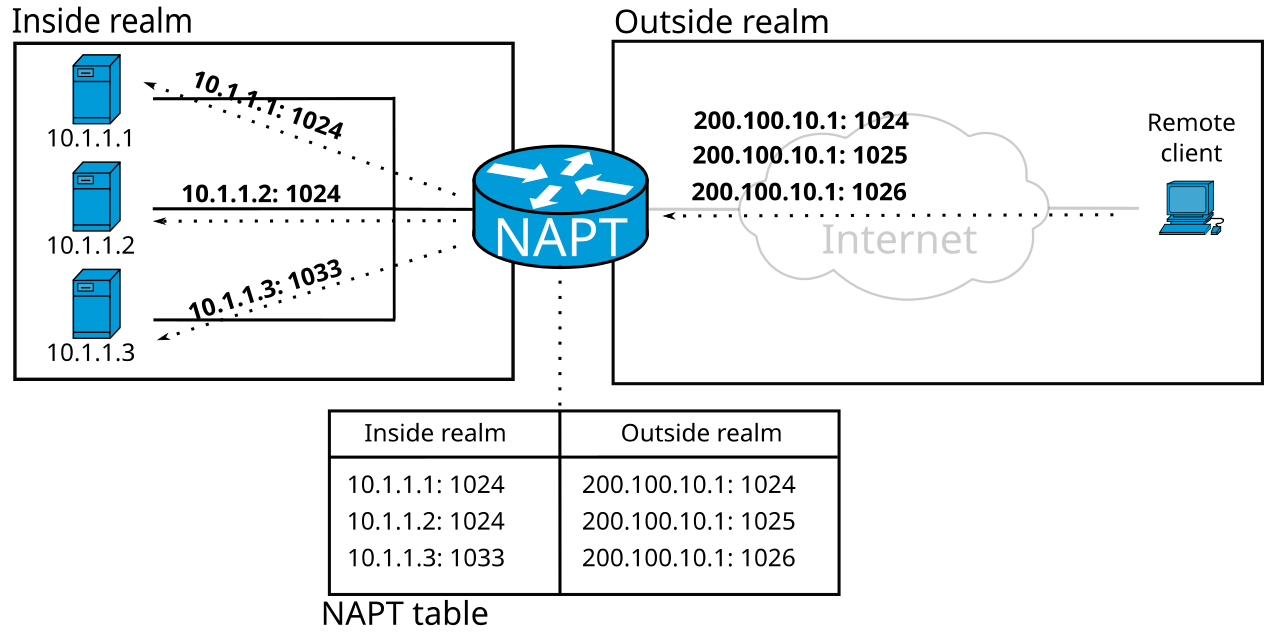
Port forwarding is a network configuration technique that redirects incoming internet traffic from a specific port on a public IP address to a designated device and port inside a private local network. It is also commonly called port mapping. Without it, devices behind a router remain unreachable from the internet, which is usually the default state for home and office networks.
What is port forwarding?
Most home and small-office networks rely on a single public IP address assigned to the router. Every phone, laptop, and server inside shares that address through Network Address Translation (NAT). This setup works well for browsing the web or streaming video, because those activities start from the inside and the router knows where to send replies.
But what if you want to reach a device from the outside? A security camera, a game server, or a development machine can't receive unsolicited connections unless the router knows where to deliver them. Port forwarding solves this by creating a static rule: traffic that hits the router's public IP on a specific port gets rewritten and passed to a specific internal IP and port. This rewriting of the destination address is technically called Destination NAT (DNAT). Wikipedia's overview of port forwarding covers the technical foundations in depth.
The rule is persistent.
Once configured, the port stays open and the mapping remains active until someone deletes it. That's different from dynamic approaches that open holes only when an application asks for them. Because the router's firewall typically blocks all unsolicited inbound traffic by default, port forwarding acts as a controlled exception to that rule.
How does port forwarding work?
The process depends on the distinction between private and public addressing. Devices inside a LAN use ranges like 192.168.x.x or 10.x.x.x. These addresses aren't routable on the open internet. The router holds the single public IP and acts as a gateway, tracking every outbound connection in a state table so return packets find their way back to the right phone or laptop.
When an external client connects to the router's public IP on a forwarded port, say 203.0.113.1:8080, the router checks its DNAT rule. If the rule says "forward port 8080 to 192.168.1.50:80," the router rewrites the packet's destination header and pushes it onto the LAN. The internal web server at 192.168.1.50 receives the packet as if it had been sent directly, though it hasn't. The rule specifies a protocol, usually TCP or UDP, because the router must know which transport-layer traffic to intercept.
Return traffic follows the same path in reverse. The server sends its reply to the router, which rewrites the source address back to the public IP and forwards the packet to the original client on the internet.
The entire exchange is transparent to both sides.
Some applications attempt to skip manual configuration by using UPnP (Universal Plug and Play). When enabled, UPnP lets software on the LAN request its own forwarding rules automatically. It's convenient, but not every router supports it reliably, and it can introduce security risks if malicious or buggy software opens ports without oversight.
Port forwarding vs. NAT and related concepts
People often confuse port forwarding with NAT itself, but they serve opposite directions. NAT allows many internal devices to share one public IP for outbound connections. Port forwarding adds explicit inbound pathways on top of that NAT foundation. One gets you out; the other lets selected traffic in.
Static one-to-one NAT maps an entire public IP to a single internal host, exposing every port on that machine. Port forwarding is more selective. You might expose only TCP port 443 for a web server while keeping everything else hidden. That reduces the attack surface significantly.
Port triggering is another related feature. Instead of keeping a port open all the time, triggering watches for outbound traffic from an application and temporarily opens the corresponding inbound port. Once the session ends, the port closes. Forwarding, by contrast, is always on.
In recent years, tunneling services and reverse proxies have become popular alternatives. ngrok's explanation of port forwarding describes how outbound tunnels can bypass CGNAT and avoid direct router exposure. Tools like ngrok or SSH port forwarding establish an outbound connection from the internal device to a relay server. External users connect to the relay, not directly to the router. This bypasses Carrier-Grade NAT (CGNAT), strict firewalls, and the need for a public IP entirely. SSH dynamic port forwarding takes this a step further by creating a SOCKS proxy over an encrypted channel. Rather than mapping a single port, it turns the SSH server into a flexible jump host for multiple destinations.
How to configure port forwarding
Setting up a rule usually means logging into the router's administration panel and navigating to a section labeled Virtual Servers, NAT, or Port Forwarding. You'll need four pieces of information: the external port number, the internal device's IP address, the internal port number, and the protocol (TCP, UDP, or both).
Before creating the rule, reserve a static IP address for the target device in the router's DHCP settings. If the device's IP changes, the forward will break silently.
For a quick software-based alternative, SSH can forward ports without touching the router. Suppose you have SSH access to a public server and want to reach a private database on your LAN. From your local machine:
# Forward local port 5433 to the remote LAN database at 10.0.0.15:5432
ssh -L 5433:10.0.0.15:5432 [email protected]
Once connected, pointing your database client to localhost:5433 tunnels the traffic through the SSH connection. The router doesn't need a forwarding rule because the tunnel originates from inside the network.
You can verify that a public port is reachable with a port scanner:
$ nmap -p 8080 203.0.113.10
Starting Nmap 7.94 ( https://nmap.org )
Nmap scan report for 203.0.113.10
PORT     STATE SERVICE
8080/tcp open  http-proxy
An open result confirms the forward is active and the service is responding.
Security considerations
Every forwarded port is a doorway. Even if the service behind it requires authentication, software vulnerabilities or weak credentials can turn a small convenience into a major breach. Security best practice is to forward only the ports you absolutely need, keep the underlying software patched, and monitor logs for unexpected connection attempts.
Never forward common management ports like 22 (SSH) or 3389 (RDP) directly to the internet without additional protections such as key-based authentication, VPN gating, or IP allowlisting. Automated scanners probe these ports constantly.
Automated bots scan the entire IPv4 address space for open ports every day. An exposed service with a default password or an unpatched vulnerability can be compromised within hours. Where possible, place forwarded services behind a reverse proxy with TLS termination and rate limiting to add layers of defense.
If your ISP uses CGNAT, traditional port forwarding won't work because you don't have a unique public IP. In those cases, a VPN with ephemeral port forwarding or a tunneling service is often the better path. Ephemeral forwarding assigns a temporary public port for a limited time, useful for peer-to-peer applications without permanently exposing your network.
When to use port forwarding
Port forwarding fits scenarios where an internal service must be reachable from the wider internet. Home users set it up for media servers, game servers, IP cameras, and smart-home hubs. Developers use it to expose local webhooks or test environments to remote collaborators.
Small businesses sometimes forward ports to access surveillance systems or internal applications without paying for cloud hosting. While this saves money, it also places the burden of security entirely on the local network administrator. For production services, managed hosting or cloud virtual machines usually offer a more defensible architecture.
Yet it's not always the right tool. If you're behind CGNAT, lack a static public IP, or don't control the router, tunneling services and VPNs provide the same result with less friction. Understanding how IP addresses work and how DNS resolves names helps you decide whether direct forwarding or an intermediary service makes more sense for your setup. For diagnosing connectivity issues across networks, tools like traceroute and MTR can reveal where packets stop.
Port forwarding is a foundational networking concept. It bridges the gap between private LANs and the public internet, but it demands careful configuration. Use it deliberately, secure it properly, and always know exactly which door you've left open.